TL;DR
Internal communicators keep asking the same questions: how to prove employees actually read an email, how to personalize a newsletter without building ten versions, when to move past Outlook, and how to reach staff who never open a corporate inbox. This guide answers them in plain terms.
- Employee newsletter software runs a recurring publication; internal email software governs and measures one-off sends. Most platforms do both.
- Personalization comes from one master newsletter with dynamic content blocks, not multiple versions.
- Open rates no longer prove readership. Reach, read rate, and story-level engagement do more.
- Outlook delivers email well. It was never built to target audiences, govern executive sends, or report on a campaign.
- Frontline staff need mobile, SMS, or signage, since email alone won’t reach them.
Section 1 - Employee newsletters and internal email basics
Most employees give internal communications almost no time. The 2026 IC Index, a survey of 5,000 UK workers, found that one in five have no time, or hardly any, to read updates from their employer, and most of the rest spend ten minutes a day or less. So the choices in this section aren’t academic. Pick the wrong format or the wrong tool and you’re wasting the little attention you’re given.
What is employee newsletter software, and how is it different from regular email?
Employee newsletter software is a tool built to produce a recurring internal publication: a branded, scheduled digest that gathers several updates into one place. The difference from regular email is in the job it does. A standard email client sends a message and moves on. Newsletter software gives you templates, reusable content blocks, audience targeting, and reporting on what people actually read, because a newsletter is a product you publish on a schedule, with an audience that expects it.
What is internal email software, and how is it different from Outlook or a marketing tool like Mailchimp?
Internal email software is a tool for sending and measuring one-off messages to employees: the announcements and one-off policy notes that don’t belong in a recurring newsletter. It works on top of your existing email, so messages still arrive in the normal inbox, but it adds what Outlook and marketing tools were never built to do.
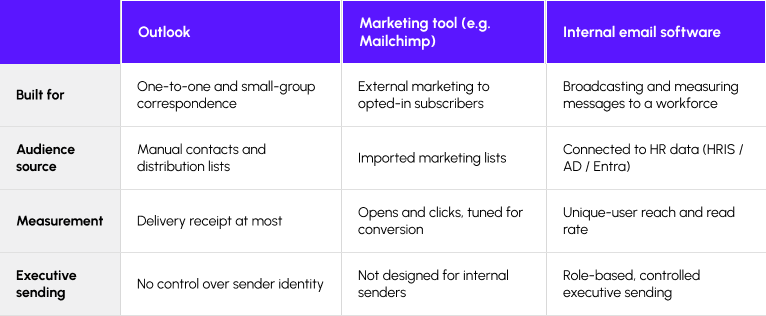
Outlook is built for correspondence—you, writing to a person or a distribution list. It has no real audience targeting, and its measurement stops at a delivery receipt. Controlling who gets to send under the CEO’s name isn’t something it was designed for. A marketing tool like Mailchimp is built for a different problem: reaching external customers who subscribed, with unsubscribe handling and compliance rules made for a public audience. Point it at your own staff and you’re running your workforce like a mailing list, with no link to your HR data and analytics tuned for sales conversion rather than whether people understood a policy.
Most organizations don’t buy these as two separate products. An employee communications platform is the tool that does both jobs from one place—running the recurring newsletter and governing the one-off sends—on the same audience data and the same reporting.
What’s the difference between an employee newsletter and an internal email - and when should you use each?
A newsletter is a recurring, curated digest. An internal email carries one message and does one job. Use the newsletter to gather several non-urgent updates on a schedule. Send a single email when one thing needs to go out on its own, usually fast.
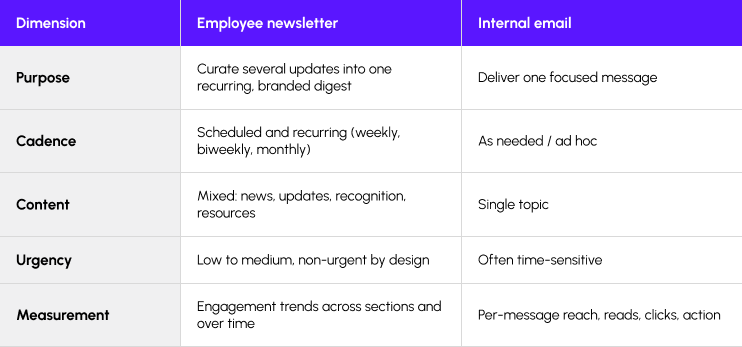
A quick test for which is which: if it can wait until Thursday and sit happily beside four other updates, it’s a newsletter item. If it can’t wait, or can’t share the page, it goes out on its own.
One thing worth holding onto before the rest of the guide: relevance is what earns that ten minutes. In the same survey, employees who could opt in and out of the communications they received were far more likely to call them relevant—76%, against 51% of those who had no such choice. Almost everything that follows, from targeting to read rates, is a way of earning that relevance instead of assuming it.
Section 2 - Planning, writing and designing newsletters that get read
Adequate communication and good communication look almost identical from the outside, and employees can tell them apart anyway. In the 2026 IC Index, workers who rated their organization’s communication a 7 out of 10 were much likelier to recommend the place to work than those who gave it a 6—70% against 47%. One point on the scale, twenty-three points of advocacy between them, and the difference is the craft this section is about.
How do you plan and produce an employee newsletter without it taking days?
Produce it on a template, not a blank page, and keep the whole job in one tool. On most teams the writing isn’t what burns the day. The time goes on everything around the writing—rebuilding the layout every issue, then chasing sign-off through an email thread that won’t die. Move to a brand-controlled template with reusable content blocks and you assemble the issue by choosing what goes in it, instead of starting over each time.
Framework — The newsletter production workflow
- Set the goal for the issue. Are you informing people or asking them to do one specific thing? Decide before you write a word.
- Build on a brand-controlled template with reusable, drag-and-drop content blocks, so structure and branding come for free.
- Draft in the platform, not in Word. One master version, top story first.
- Route for approval inside the tool (see Section 6), not through email chains.
- Schedule by segment and time zone, then let the analytics tell you what to change next issue.
How do you write internal emails and subject lines employees actually open and read?
One email, one message. If a message has more than one job to do, split it—two clear emails beat one that tries to cover everything, and anything that isn’t urgent probably belongs in the newsletter anyway.
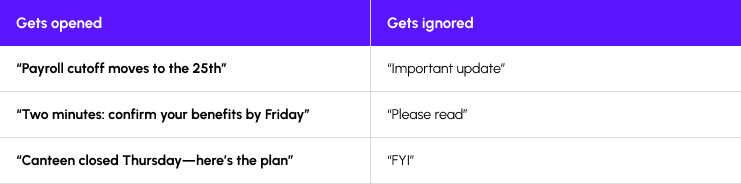
Subject lines should describe what’s inside, not tease it. The test is whether someone can tell what you want from them before they open it.
When a message goes out under an executive’s name, it should sound like that person actually wrote it. Employees can tell the difference between a leader talking and a comms team ventriloquizing, and they read the first one.
What makes a good employee newsletter design and structure?
A clear hierarchy and a mobile-first layout. Most employees read on a phone, half-distracted, so the design has to survive a small screen and a five-second glance. The top story goes first and looks like the top story. Everything below it should be scannable enough that someone can skim the whole thing in under a minute and still come away with what mattered.
The format itself has evidence behind it. Gallagher’s 2026 report, drawn from more than 1,300 communications and HR professionals worldwide, found that the most mature comms teams overwhelmingly favor short, scannable emails—85% of them, against 69% of the least mature teams, who still lean on long-form email. Gallagher describes that long-form habit as a legacy one that adds to overload. Short and scannable is what the teams who measure their results have settled on.
Checklist — Newsletter planning & publishing
- Defined audience and segments
- One clear goal for the issue
- Brand-controlled template and consistent structure
- Most important item first; mobile-first, accessible layout
- Deliverability confirmed with IT (allow-listing, authentication)
- Metrics chosen before send; scheduled by time zone
Section 3 - Segmentation, personalization and multilingual communications
Segmentation is the part almost everyone skips. In Gallagher’s 2026 report, 77% of organizations said they don’t regularly profile their audiences—no personas, no archetypes, nothing that separates one reader from the next. One size, fits nobody in particular. Everything in this section is a way out of that.
How do you target internal emails and newsletters to the right employees?
By pulling audiences from a system that already knows who works where—your HRIS, Active Directory, or Entra—instead of maintaining lists by hand. Once the platform reads employee attributes like role, location, department, business unit, and language preference, you can send the right message to the right group without building or updating a single distribution list.
The payoff is measurable. Gallagher links strong audience-targeting capability to an 18% reduction in information overload and a 14% drop in audience burnout—fewer people buried under messages that were never meant for them.
How do you personalize an employee newsletter without creating multiple versions?
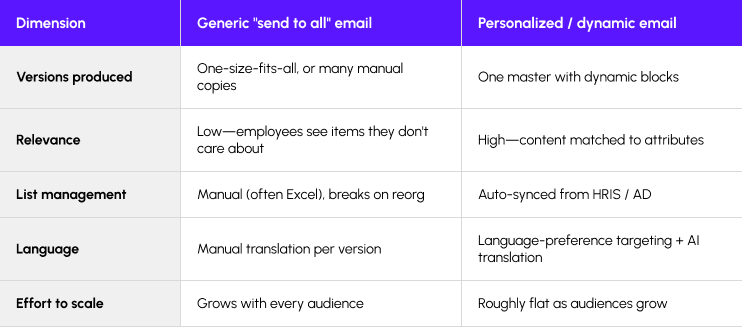
One master newsletter with dynamic content blocks. Start with the problem it solves: Gallagher found that 75% of communicators call tailoring their messaging critical, while only 20% do it regularly. Almost everyone knows relevance matters, and most send the same thing to everybody anyway, because doing otherwise has meant building and maintaining a separate version for every audience.
Dynamic content removes that trade-off. You build a single issue, then set rules so each block shows or hides depending on who’s reading. The London office sees its town-hall notice while the Chicago plant sees a safety update, and the CEO’s message goes to everyone. One build, one send, and nobody gets a wall of items that has nothing to do with their job.
What is dynamic content in an employee newsletter?
Dynamic content is a block in an email or newsletter that changes based on who opens it. Instead of writing one version for the sales team and another for the warehouse, you write one newsletter with conditional blocks, and the platform decides which blocks each person sees from their profile data—location, role, language, and so on. The reader just sees a newsletter that happens to be relevant. The matching of content to person happens automatically, once.
How do HRIS and Active Directory / Entra data keep audiences accurate—even after a merger or reorg?
Because the audience updates itself. When someone changes role or leaves the company, that change happens first in the HR system, and a connected comms platform reads it automatically. Your segments stay correct without anyone editing a spreadsheet. This is the fix Gallagher points to for manual lists that fall apart on reorg—it’s worst exactly then, when hundreds of people change department in a week and a hand-built list is wrong the moment you save it.
How do you create and translate multilingual employee newsletters efficiently?
Target by language preference, then use AI-assisted translation with a human check before send. The language a person prefers is another attribute in the HR data, so you can send the same newsletter and have each reader receive it in their own language. AI handles the first-pass translation in seconds. A fluent human still needs to read it before it goes out, because machine translation gets tone and idiom wrong in ways that matter more in a message from your own employer than in a product description.
Framework - A five-step personalization process
- Connect a source of truth—HRIS, Active Directory, Entra, Paycom—so audiences update on their own.
- Define segments by role, location, department, business unit, workforce type, or language preference.
- Build one master newsletter with dynamic content blocks.
- Show or hide blocks by segment, so each employee sees only what’s relevant.
- Localize by language preference using templates and AI-assisted translation, with human review.
Section 4 - Measuring engagement and proving ROI
Ask a communications team how their last campaign did and most will tell you the open rate. Ask what the open rate proves and you get a pause. This section is about what to measure instead, and how to turn it into something a leadership team will act on.
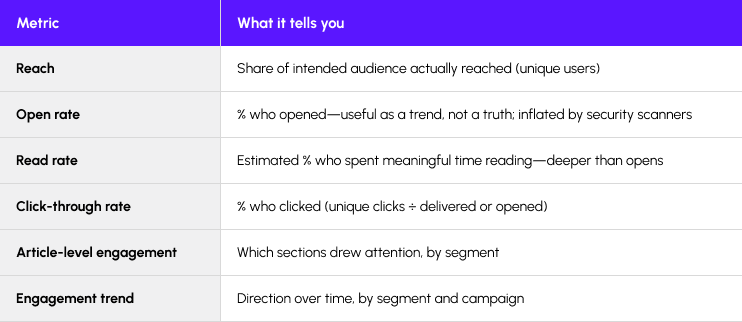
How do you measure employee email engagement beyond open rates?
By measuring what happens after the open. An open tells you a mail client loaded an image somewhere. It doesn’t tell you a person read a word. Gallagher’s 2026 report found that 70% of teams still measure mainly output—opens, clicks, page views—while only 16% measure outcomes like sentiment, and just 12% connect their work to business impact. The metrics worth reporting are the ones most teams skip.
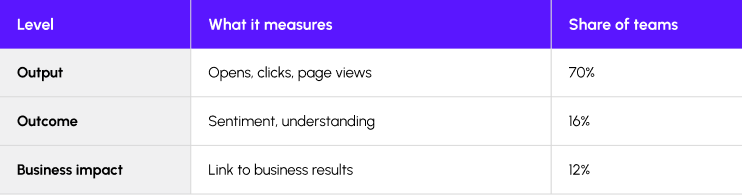
Gallagher 2026. Most teams never leave the top row.
How can you actually tell if employees read an internal email (not just opened it)?
Read rate is the closest proxy. Instead of counting opens, a comms platform estimates how long each person spent with the message and reports the share who spent enough time to have read it, rather than previewed it and moved on. It’s an estimate, not a lie detector, but it’s a far better signal than an open ping that fires the instant an image loads.
What is campaign-level measurement, and why does it matter more than single-send opens?
Campaign-level measurement rolls up the performance of a series of related messages instead of judging each send on its own. One newsletter’s open rate tells you almost nothing. The trend across a quarter—whether reads are climbing or sliding, and which segments have quietly checked out—tells you whether your communications are working. Leaders make decisions on the trend, not on Tuesday’s send.
Why can open rates be inflated or misleading—and how do security tools distort them?
Because a lot of “opens” aren’t people. Corporate security scanners open messages before any human does—they pre-fetch images and follow links to check for threats, and every one of those checks registers as an open. Apple’s Mail Privacy Protection does something similar, loading images for the user in advance. The result is an open count padded with machine activity, which is why a headline open rate can sit on top of a message almost nobody actually read.
How do you prove the ROI of internal communications and build a business case for leadership?
Connect a metric you control to an outcome leadership already tracks, and show them moving together. “We sent 40 newsletters this year” is activity. A business case sounds different: safety-briefing read rates climbed over two quarters, and recordable incidents fell over the same window.
Part of the job is getting leaders to ask for the right number in the first place. Gallagher found that fewer than one in three of the leaders comms teams report to actually request business-impact metrics—27%—while most ask for sentiment or reach. If nobody upstream is asking whether the work moved the business, the measurement stays stuck at output.
The evidence that it’s worth the effort sits on the employee side. In the 2026 IC Index—the same UK survey—employees in organizations with a dedicated internal communications function were much more likely to say their company’s strategy was clearly communicated: 72%, against 50% where there was no such function. That gap is what investment in communication buys, stated in a number a leadership team understands.
Framework — How to measure employee email success (5 layers)
- Reach—the share of the intended audience the message actually reached, counted by unique person, not by device.
- Reads—estimated meaningful reading time, not an open ping.
- Engagement—clicks and reactions, plus which segments engage with which stories.
- Campaign roll-up—performance across a series, not one isolated send.
- Business outcomes—participation, comprehension, retention, safety awareness, executive confidence.
Checklist — Measurement / campaign review
- Report unique-user metrics, not device-level opens
- Track read rate and article-level engagement, not opens alone
- Roll up to campaign level, not single sends
- Segment results (who engaged, who didn’t)
- Tie a proxy metric to a business outcome (retention, participation, comprehension)
- Package a leadership-ready view (trend plus narrative)
Section 5 - Outlook vs. an employee communications platform
Every company still sends important messages from Outlook, and for a one-to-one note that’s exactly right. The problem is the CEO announcement going to twelve thousand people, and it’s a problem that has got sharper as trust in leaders has fallen. The 2026 IC Index put its overall Trust Index at 58%, down seven points in a year, with trust in the most senior leader at 50%, down nine. That decline shapes every executive message a company sends, and it’s part of why the tool you send with—and whether the message even arrives looking legitimate—matters more than it used to.
Why isn’t Outlook enough for internal communications anymore?
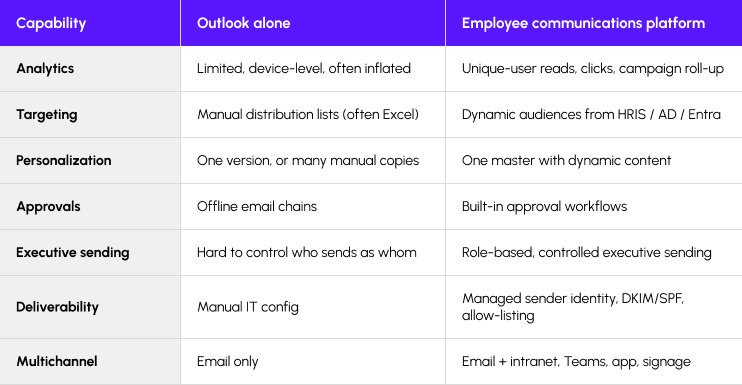
Because Outlook was built for correspondence. Broadcasting to a whole workforce is a different job. The analytics stop at a delivery receipt, so you can’t tell who read a message, and the open data you can scrape is device-level and easily inflated by security scanners. Audiences are manual distribution lists—kept in a spreadsheet, usually—and they break the first time someone changes department. There’s also nothing to control who sends under an executive’s name, which is how a well-meaning assistant ends up emailing four thousand people as the CEO by mistake. The table further down shows where the gaps are.
How does an employee communications platform work with Outlook (not instead of it)?
It works on top of the email you already have. Employees still get messages in the same Outlook inbox they always used—nothing to install, no new app to check. The change is on the sender’s side. The platform pulls audiences straight from your HR data and reports on what people actually read, while the message itself goes out through the mail system you already run. Email keeps doing the part it’s good at, and the targeting and measurement happen before anything is sent.
How do you send internal emails from executives so they look trusted and internal, not external?
Get the technical setup right so the message authenticates as genuinely internal, then make sure the right person appears to be sending it. On the technical side, the sending domain needs SPF and DKIM records—two email authentication standards that together let receiving servers confirm a message really came from your domain and wasn’t spoofed—and IT needs to allow-list the platform so its mail isn’t quarantined.
The stakes here are higher than the technical setup suggests. Email is how employees say they want to hear from the top: in the same survey, 59% preferred email for messages from the CEO or most senior leader, ahead of any other channel. So the CEO is already sending through the channel people want. Whether the message is believed depends partly on whether it arrives looking like what it is. A message that authenticates cleanly and arrives unmistakably internal is the baseline for being believed. Miss that, and a note from the CEO can end up in spam or arrive stamped with an external-sender warning that tells everyone not to trust it.
Checklist - Executive sending setup
- Authenticate the sending domain with SPF, DKIM, and DMARC so servers confirm the mail is really yours
- Have IT allow-list the platform’s sending servers so messages aren’t quarantined
- Send from a real internal address employees recognize, not a no-reply external one
- Test-send across a few departments before the real send
Section 6 - Governance, approvals and enterprise controls
The gap between wanting good governance and having it is wide. Gallagher’s 2026 report puts numbers on it: 73% of organizations aim for a strategic communications model, and only 18% believe they’ve reached one. That distance is where uncontrolled sending and the occasional compliance scare live. This section is about the structure that keeps that from happening.
How do approval workflows work for internal communications?
An approval workflow routes a message through the people who need to see it before it sends, inside the tool where it’s being built. The draft moves from writer to reviewer to publisher on a fixed path, each step recorded, so nothing goes out without the right sign-off and everyone can see where a message is stuck. Compare that to the usual method—a draft pasted into an email chain, three people replying with edits at once, and no single version anyone trusts.
Who should be allowed to send messages from executives—and how do you control it?
Very few people, and through role-based permissions rather than trust. Sending under an executive’s name should be a specific right granted to named people, not something anyone with the login can do. In practice that means the platform lets a communicator prepare a message that goes out as the CEO, but the CEO or their office approves it before it sends, and the system records who did what. The alternative is the shared password and the hope that nobody makes a mistake, which holds right up until someone does.
How do large enterprises govern employee communications across many contributors and regions?
With a central-and-local model: one set of standards held centrally, and delegated access that lets local communicators work within it. Headquarters owns the brand-controlled templates and the rules for who can approve what. A communicator in a regional office can create and send to their own audience without raising a ticket, but they’re working inside locked templates and a workflow they can’t route around. It scales because local teams move at their own speed while the guardrails hold everywhere at once.
The reason this matters is that most teams are missing the foundations underneath it. Gallagher found that for five of seven core strategic assets—things like employee value propositions and manager toolkits—more than half of teams operate with no codified standard at all, and only one in four have a channel framework. Governance tools help, but they work best on top of standards a team has actually agreed and written down.
Framework - An approval workflow example
- Request—a communicator drafts on an approved template.
- First approver—reviews content and audience.
- Second approver—compliance, brand, or executive sponsor, as needed.
- Publisher—a permissioned owner sends or schedules the final version.
- Audit trail—who changed what, and who approved, captured in the platform.
Checklist - Governance
- Role-based permissions: who can create, edit, approve, and send
- Controlled executive access, so “send as the CEO” is a named right
- Multi-step approval workflows inside the platform, not email chains
- Brand-controlled, locked templates
- Central governance with delegated local communicator access
- Audit trail and version history on every send
Section 7 - Multichannel communications and reaching frontline employees
Email works for the people at a desk. For everyone else it can be close to invisible, and the gap shows up in who hears about the things that matter. In the 2026 IC Index, 20% of digitally disconnected employees typically heard about big organizational change through word of mouth rather than from their own leaders. When a fifth of your frontline is learning about change in the corridor, email is only covering the half of the workforce that sits down to work.
How do you build a multichannel internal communications strategy?
Start from where people actually are, then match channels to them. A desk worker checks email. A nurse or a delivery driver may go a whole shift without opening a corporate inbox, and picks up news from a phone or a screen on the wall instead. A multichannel strategy uses email alongside an intranet, a mobile app, Teams, and digital signage—not to send everything everywhere, but so each message has a route to the people it’s for.
Framework - A multichannel planning approach
- Map the audience to channels—desk versus frontline, and who reliably checks what.
- Pick a primary and a supporting channel per message—email plus signage for a safety notice, say.
- Reuse one piece of content across channels rather than rewriting it for each.
- Sequence and time the message so the channels reinforce rather than clash.
- Measure across channels in one place, so email, app, intranet, and signage roll up together.
How do you reach frontline, field, and non-desk employees who never check email?
Give them a channel that fits how they work—usually a mobile app or SMS, backed by digital signage in shared spaces. The principle is to meet people where they already look. Requiring them to come to you is how you lose them. A warehouse team glances at a screen by the clock-in point; a field engineer opens a phone app between jobs. For people with no individual login at all, a shared kiosk in a break room does the job.
There’s a real cost to getting this wrong, and it isn’t only missed messages. The same UK survey found a 13-point gap in psychological safety between the connected and the disconnected: 52% of computer-based employees felt able to share their opinions without fear, against 39% of those not often at a computer. People who are hard to reach also tend to feel less heard, and the two problems compound. A channel that actually reaches the frontline is also a channel they can answer back on.
How do email, mobile apps, and digital signage work together—and how do you measure across them?
They divide the work by reliability and reach. Email and the app carry messages that need to land with a named person and be measured. Signage covers shared physical space, where you can’t confirm who saw what but you can put something unmissable in front of everyone who walks past. The trick is to run them from one platform, so a single safety message goes to the app, the relevant screens, and email at once, and the reporting shows combined reach instead of three disconnected numbers. Measure reach, not sends—confirming a message went out isn’t the same as confirming it arrived.
Checklist — Frontline communications
- Identify employees without reliable corporate email
- Provide a mobile app or SMS alternative
- Use digital signage for shared spaces
- Keep safety and operational messages on high-reliability channels
- Confirm reach, not just send
- Report frontline engagement separately from desk workers
Section 8 - Advanced and future-ready employee communications
The most advanced thing many communications teams could do is send less. Gallagher’s 2026 report found that high message volume correlated with a 30% jump in teams rating leadership trust a significant risk, and a 24% rise in audience-burnout risk. The tactics in this section are ways to get more out of what you already send.
What advanced tactics measurably improve internal communications?
Four, each of which you can measure, in rough order of effort:
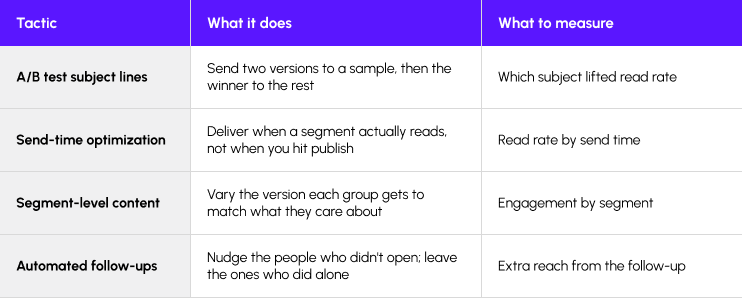
None of these is exotic. They’re the difference between guessing what works and knowing, and they only pay off if you’re already measuring read rate rather than opens—which is why this section sits after the one on measurement, not before it.
How can AI help with internal communications—and where should you be cautious?
AI is genuinely useful for the work around a message—drafting a version to react to, or reading a thousand survey responses faster than any person could. The caution is that most teams aren’t ready to trust it yet, and they’re right not to be. Gallagher found only 36% of practitioners agree they have the skills to use AI well. Gallagher’s own phrase for the pattern is that AI amplifies whatever maturity already exists—it makes a good team faster and a sloppy one sloppier, because it does whatever you ask more quickly, including the wrong thing.
Checklist - Using AI safely in internal comms
•A human reads and approves everything before it sends
•AI use stays inside your company’s AI and data policy
•Nothing personally sensitive about employees goes into a tool you don’t control
•Machine translation gets a fluent human check before publishing
How do you communicate through change - mergers, restructuring, return-to-office, leadership transitions?
Start before you think you’re ready, and keep talking. Change is the hardest thing internal communications does and the thing teams are least prepared for: Gallagher found change-management communication ranked the top skill priority for the year ahead, named by 57% of teams, while 61% have no formal approach to it at all. That gap between how much it matters and how ready anyone is for it is the widest in the report.
The most common failure is timing. In the 2026 IC Index, only around a quarter said their organization communicated early in a change process—by the time most people heard anything, the decisions were made and it was too late to ask. The triggers are familiar—a merger, a restructure, a return-to-office mandate, a change at the top—and they share a pattern: people fill an information vacuum with rumor, and rumor is always worse than the truth. What makes people feel supported through change is honesty about the impact, delivered early enough that they can still do something about it—and a channel to answer back.
Checklist — Common mistakes to avoid
• One generic newsletter for everyone, with no targeting
• Reporting sends and activity instead of outcomes
• Managing audiences in Excel instead of a connected source of truth
• Running approvals through email chains instead of workflows
• Relying on email alone to reach a frontline workforce
• Measuring opens and never read rate
Section 9 - Frequently asked questions
Can Outlook replace an employee communications platform?
No. Outlook sends email well and was never built for the rest of the job—things like pulling audiences straight from your HR data, or telling you who actually read a message. Most companies add a platform around Outlook rather than replacing it: employees keep the inbox they already use, and the platform handles the targeting and measurement Outlook was never built for.
How often should you send an employee newsletter?
There’s no research-backed figure for this in either of the reports behind this guide, and anyone who hands you one is guessing. Cadence follows how much genuinely useful information you have, not how visible you feel you should be. As a rough steer—judgment, not data—weekly works for large organizations with real news every week, and monthly works for smaller teams or a purely strategic update, with most landing between the two. The trap is committing to a frequency and then padding issues with filler to hit it. Publish when you have something worth reading, on a rhythm steady enough that people know roughly when you’ll land.
What’s the most important metric for internal communications?
There isn’t one, and hunting for a single number is how measurement goes wrong. Reach tells you how many people a message got to, and read rate whether they stayed with it—but neither says whether it did the business any good. Teams that measure well combine a few signals and tie at least one of them to an outcome leadership already tracks. Worth remembering how rare that last step is: Gallagher’s 2026 data puts the share of teams connecting communication to business impact at just 12%.
Should every employee receive the same communication?
Usually not, and there’s a real cost to pretending otherwise. Relevance is what makes people read, and it falls away the moment someone opens a newsletter full of items meant for another team. There’s an evidenced angle most teams miss: in the 2026 IC Index, only 42% of employees said they saw stories about people like themselves in their internal communications—and those who did were much likelier to speak well of their employer, 79% against 41%. Sending everyone the same thing signals to most of your workforce that the communication isn’t really for them.
How do you reduce email fatigue?
Fatigue comes from irrelevance more than volume. People will read a lot of email if it’s all relevant to them, and switch off from even a trickle that isn’t. The fix is relevance: target by audience so people stop getting items meant for someone else, fold routine updates into a newsletter instead of a stream of separate sends, shift some traffic to other channels, and clear out duplicate messages before they go. Then measure what people actually engage with, and let that thin what you send next. The goal is simple—an inbox where opening the next message feels worth the time.
What does a mature internal communications program look like?
It runs on systems, so it doesn’t depend on any one person’s heroics. In an immature program, the quality of communication rises and falls with whoever’s doing it that week. A mature program doesn’t have that problem: audiences update themselves, templates hold the brand, approvals follow a set path, and measurement goes past opens as a matter of course.
Here’s what that looks like across the capabilities that matter:
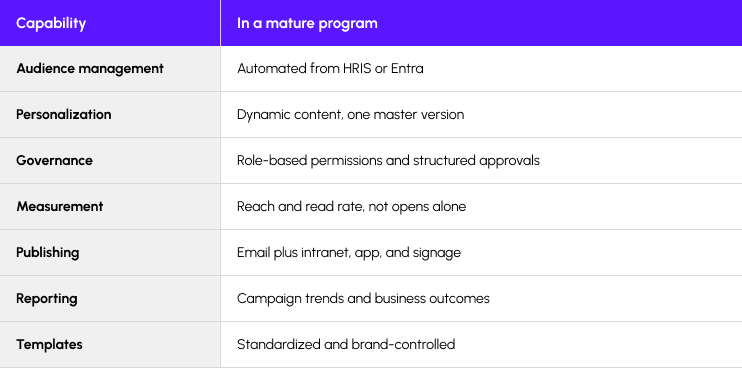
The tell is what happens when your best communicator is on leave. In a mature program, nobody outside the team notices.
Final thoughts
One last thing, and it’s the number this guide opened on. Most employees give internal communication ten minutes a day or less, and one in five give it next to nothing. Everything in these nine sections—the targeting, the read rates, the move off Outlook, the frontline channels—serves that small, borrowed window. That attention only grows when the ten minutes people already give you turn out to be worth their while. Send more and you spend it faster. That’s the whole job.