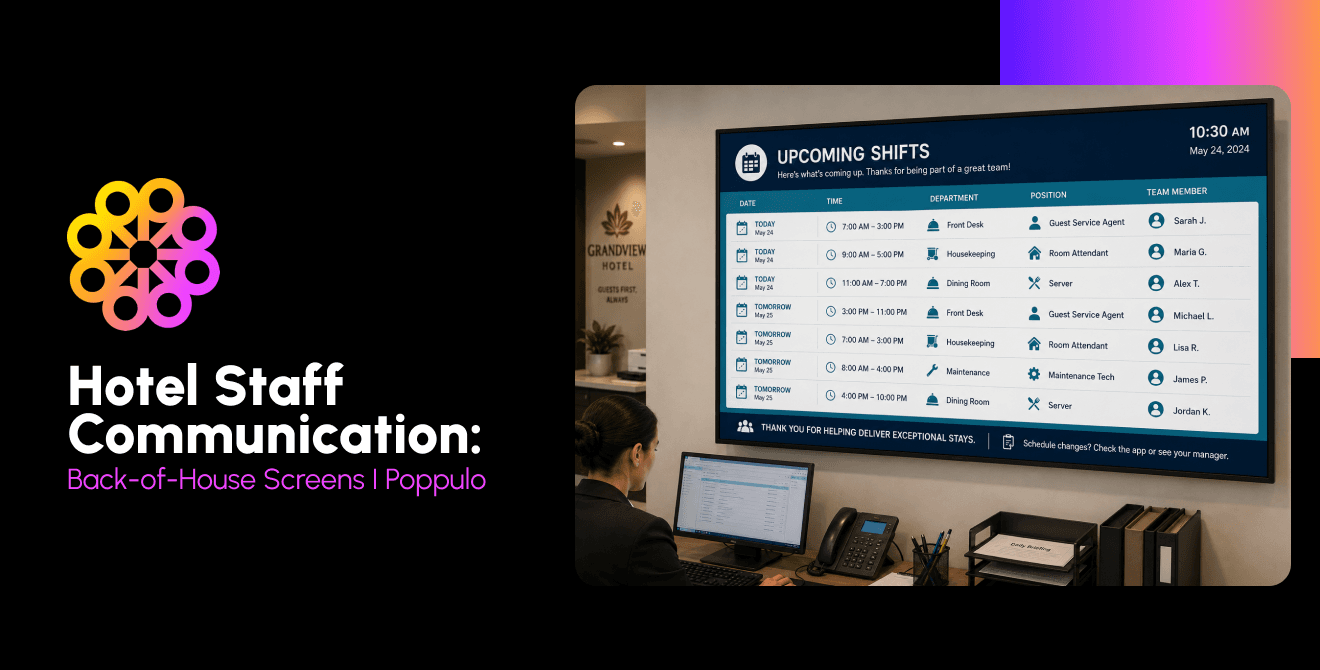
Hotels reach staff without corporate email by putting shift information on back-of-house screens, where housekeeping, food and beverage and engineering teams are. The same Poppulo Digital Signage platform used for guest communication can also be used to help keep arrivals, VIPs, safety alerts and recognition visible across shifts, with updates flowing automatically from hotel systems.
Why Hotel Staff Communication Breaks Down
Hotel staff communication breaks down when the message depends on a channel employees cannot or will not check during a shift. Many housekeepers, kitchen employees, and engineering technicians do not have corporate email. A message sent to an inbox may never reach the people who need it before check-in, a banquet change, or an equipment problem. Physical posterboards can attempt to remedy this but are often ignored and blend in with typical day-to-day visual clutter, plus become irrelevant incredibly quickly.
Managers often fill that gap with verbal handoffs, and paper noticeboards. Those methods can move information quickly, but they also create separate versions of the truth. As one example, a brand update reaches the general manager but stops before the evening shift. A safety notice appears in one language even though several languages are spoken across the property.
The result is not merely a communications problem, but an operations problem. Missed VIP notes, late room-status updates, and unclear banquet changes create extra calls, repeated questions and avoidable guest friction. A dependable system must reach employees in the flow of work, not ask them to step away from it.
How to Communicate with Hotel Staff Who do not have Company Email
Communicate with hotel staff who do not have company email by using shared channels at the places where work begins and changes hands. Back-of-house digital signage screens can carry the daily briefing, while a mobile or in-person feedback route lets employees ask questions and report what has changed. To get the most out of these displays, utilize the following tips:
Go where staff already are. Place screens near time clocks, staff entrances, break rooms, and department work areas. Employees should not need to make a special trip to find the update.
Keep one source of truth. Publish approved content from one content management system so department screens, lobby displays, and meeting-room signs do not contradict one another. A cohesive message is crucial for operational efficiency.
Target by department and language. Send the banquet change to food and beverage, the room-priority list to housekeeping, and the maintenance notice to engineering. Use translated versions where they improve understanding. This condenses the number of messages each team sees, allowing them to focus on what’s important.
Keep it scannable. Lead with the action, deadline, and location. Use large type, short sentences, and a clear visual hierarchy that can be read in seconds.
Back-of-house Screens that Reach Every Shift
Back-of-house screens work best as a network of purpose-built touchpoints, not as one television in a distant break room. Each location should match the pace, viewing distance, and conditions of the work area.
Staff entrance and time clock: Use a portrait or landscape display at eye level for the top three shift priorities, staffing notes, and urgent alerts.
Break room: Use a larger landscape screen for recognition, benefits, training reminders, and company news that can stay on screen longer.
Housekeeping office and linen room: Use a compact landscape screen for room priorities, arrivals, VIP notes, linen issues, and service scores.
Kitchen: Use a bright, easy-to-clean display in a kitchen-safe enclosure, positioned away from heat and spray, for banquet changes, allergen reminders, and safety notices.
Laundry and engineering: Use a durable screen with high-contrast layouts for maintenance priorities, outages, preventive work and safety updates.
Hotel Data on Staff Screens
Hotel data can update staff screens automatically when the signage platform connects with property, event, and business systems. That turns a screen from a digital poster into a live operations channel and reduces the need to retype information every time a room, group or schedule changes.
Poppulo makes it easier for hotels to connect digital signage with the systems they already rely on, from property management and event management platforms to other hospitality technologies. These integrations help teams spend less time manually updating screens and more time focusing on guests. Whether it's keeping event schedules current, sharing important updates with staff, or displaying timely information for guests, Poppulo helps hotels keep information flowing across the property.
The same approach can bring group and banquet schedules to kitchen and service teams, display service key performance indicators, and guest scores in department areas, or add weather and local-event feeds that help teams prepare for demand. Integrations with tools such as Microsoft Power BI, Tableau, Grafana and ServiceNow can also move approved operational data onto screens. The rule is simple: show only what employees need to act, and protect guest and employee data by design.
What to Show on Back-of-house Screens
Back-of-house screens should prioritize information that changes the next action, reduces uncertainty or reinforces a service standard. A balanced playlist combines immediate operating needs with safety, training, and recognition.
| Content | Best zone | Why it matters |
|---|---|---|
| Daily shift briefing | Entrance, time clock | Puts priorities, staffing and handoff notes in view at the start of work. |
| Arrivals and VIPs | Housekeeping, front office | Helps teams sequence rooms and prepare service details. |
| Group events | Kitchen, banquet areas | Keeps times, rooms and service changes aligned. |
| Safety and emergency alerts | All zones | Provides an immediate, propertywide instruction channel. |
| Recognition | Break room, entrance | Makes good work visible across departments and shifts. |
| Brand standards | Department work areas | Reinforces the service behavior employees need that day. |
| Training reminders | Break room, time clock | Keeps deadlines and required learning visible. |
| Multilingual policy updates | Relevant department zones | Improves access to critical information for multilingual teams. |
Sample Shift Briefings and Staff Messages
A useful hotel shift briefing is short enough to scan yet specific enough to act on. Use a repeatable template so employees know where to find the most important detail.
| Date and shift | Tuesday | Morning shift | 7 a.m. to 3 p.m. |
|---|---|
| Top priority | Prepare floors 8-12 first for a 180-room group arrival at 2 p.m. |
| VIPs and arrivals | 12 VIP arrivals. Check approved service notes in the PMS; do not display sensitive guest details. |
| Events | Grand Ballroom lunch moves to 12:30 p.m. Final guest count: 240. |
| Safety | Service elevator B is offline until noon. Use elevator C and keep the landing clear. |
| Recognition | Thank you to the overnight engineering team for restoring hot water before breakfast service. |
| Need help | Contact your supervisor or scan the department QR code to report a change. |
Other messages should follow the same pattern: state what changed, who is affected, when it takes effect, and what to do next. For example: "Banquet update: The Aspen Room reception begins at 5:30 p.m., 30 minutes earlier than scheduled. Food and beverage and banquet setup teams should complete the room reset by 4:45 p.m.”
One CMS for Guest Screens and Staff Screens
With Poppulo, one content management system can govern both guest-facing and staff-facing screens while keeping their messages distinct. The brand team can control approved templates and visual standards, while property and department leaders receive role-based access to the content they are responsible for—only for the screens they need access to.
That shared platform can support lobby displays, menu boards, meeting-room signs, and back-of-house screens from one digital signage platform. A property can localize the weather, group schedule, or service message without rebuilding the brand design. Corporate teams can distribute approved campaigns across a portfolio, and emergency override can replace routine playlists with urgent instructions when seconds matter.
Clear governance is essential. Define who may create, approve, publish, and retire each content type. Set expiration dates for temporary messages. Separate staff information from guest content, and review data feeds so a public screen cannot display a back-of-house field by mistake.
Measuring what Back-of-house Screens Deliver
Keeping hotel employees informed is one thing. Getting them to act on that information is where digital signage can really make a difference. Whether it's reinforcing service standards, recognizing a job well done, or reminding staff about safety procedures, the messages employees see throughout their day can influence how they work and, in turn, the experience they deliver to guests.
Think about the impact of a simple reminder before a busy shift, or recognizing a team that's gone above and beyond for guests. These small moments can help reinforce good habits, build morale, and keep service top of mind. Over time, that can mean fewer mistakes, more engaged employees, and better guest experiences.
So how can hotels tell if it's working? Screen uptime and content playback are a good place to start, but they're only part of the picture. Looking at changes in employee engagement, safety incidents, guest satisfaction scores, and other performance measures can give hotels a better idea of where their communications are having an impact.
It's not always possible to credit digital signage for a specific improvement, but that shouldn't stop hotels from looking at the bigger picture. When employees have the information they need, they're better equipped to do their jobs well. And better service, fewer operational headaches, and happier guests are all good for business.
How Hotels use Back-of-house Screens
Hotels use back-of-house screens to coordinate daily operations, prepare for demand, and connect employees to the guest experience. A full-service property can open the day with arrivals, occupancy, group business, and weather; shift to banquet and room-priority changes during peak operations; then recognize results and preview the next shift before handoff.
A hotel group can also use the network to connect corporate and property communications. Brand standards and campaign messages can reach every location, while each hotel retains space for local events, staffing notes, and community updates. That balance gives leaders consistency without forcing every property into an identical playlist.
A practical rollout starts with one or two high-traffic staff zones and a narrow set of messages. For example, a property could pilot the morning briefing at the time clock and the room-priority feed in the housekeeping office. Set a baseline for repeated questions, update time and screen uptime, then compare results after several weeks. Feedback from supervisors and employees will show whether the placement, language, and rotation speed fit the shift.
Build a content rhythm before adding more screens. Daily operational items should have an owner and a firm expiration time. Weekly content can cover recognition, benefits, and training. Emergency content should use approved templates and a tested override process. This cadence helps prevent a common signage failure: a screen that works technically but loses attention because its message is stale.
Train content contributors on both the software and the operating rules. A department manager should know how to update a local item, when central approval is required, and which information must never appear on a shared display. Regional teams can review templates and permissions across properties, while IT monitors device health and integrations. Clear ownership keeps a growing network useful without slowing local decisions.
Most important, staff screens complement the human parts of hotel operations. They make the current plan visible, but supervisors still lead huddles, answer questions, and adjust work. When the screen, the system and the shift leader tell the same story, employees spend less time chasing information and more time serving guests.
Frequently Asked Questions
How do you communicate with hotel staff who do not have company email?
Use shared channels in the flow of work, including back-of-house screens near staff entrances, time clocks and department areas. Keep one source of truth, target messages by role and language, make content easy to scan, and provide a separate way for employees to ask questions or acknowledge critical information.
What should hotels display on back-of-house screens?
Hotels should display timely, actionable information such as shift priorities, arrivals, VIPs, group events, safety alerts, recognition, training reminders and multilingual policy updates. Match each message to the department and screen location where it will be most useful.
Can back-of-house signage show PMS or event data automatically?
Yes, back-of-house signage can show approved PMS and event data automatically through supported integrations, APIs or middleware. Automated feeds can reduce manual entry and keep arrivals, room status and event schedules current, but hotels should limit the data to what employees need.
Can staff screens show content in multiple languages?
Yes, staff screens can show targeted or rotating content in multiple languages. Use professional translations for safety, policy and compliance messages, and keep layouts consistent so employees can quickly recognize the message type.
Do back-of-house screens replace staff messaging apps?
No, back-of-house screens complement staff messaging apps and other two-way channels. Screens are effective for shared visibility and reinforcement, while apps, huddles and supervisor conversations support questions, acknowledgment and individual follow-up.
Which PMS systems can feed staff screens?
Hotels rely on a lot of different systems to keep things running, and Poppulo helps bring that information together on their digital signage screens. With flexible integrations into property management systems and other hospitality platforms, Poppulo makes it easier to keep content current without constantly updating screens by hand. Whether it's sharing event details, guest information, or operational updates, hotels can put the data they already have to better use, saving staff time and keeping guests informed.
Bring Every Shift into the Conversation
Hotel staff communication works when the message reaches the right team before it affects the guest. Poppulo brings live data, approved content and role-based control to back-of-house screens, while supporting the guest-facing displays already across the property. If you’re looking for a simpler way to keep staff and tenants informed, improve day-to-day operations, and deliver better service, request a demo to see how Poppulo can give you more from your digital signage.