At 3 a.m., a severe-weather warning reaches a hotel where guests are asleep, a conference is still running, and employees are spread across guest floors and back-of-house areas. A hotel emergency notification system helps authorized teams send clear, coordinated instructions to the people and places affected, using digital signage and mobile alerts alongside existing alarm and public-address systems. This coordinated, multi-channel approach helps enable everyone to safely make it to designated areas and understand proper protocols.
This guide explains how notification differs from life-safety detection, why hotels need more than one communication channel, how targeting and governance work, and what to test before selecting a hotel mass notification system.
What is a Hotel Emergency Notification System?
A hotel emergency notification system is a centralized, integrated platform that sends real-time alerts to guests and staff during incidents such as fire, severe weather, evacuation, and security threats. It can deliver messages through digital signage and mobile push, supplementing a hotel’s certified alarm system, public-address, voice evacuation, and other safety systems.
Notifications help people understand what’s happening and what they need to do next. Detection systems identify potential hazards, while certified life-safety systems handle critical functions required by safety codes and the building’s emergency plan. Digital signage and mobile platforms can play an important role in keeping people informed, but they’re meant to work alongside these systems, not replace them. It’s also important to have qualified professionals and local safety authorities review how these systems are designed, connected, and activated to make sure everything works together and meets the necessary requirements.
The practical goal is to coordinate guidance. The fire alarm or voice system may provide the primary evacuation signal, while a nearby screen reinforces the approved instruction and shows a location-specific route. A mobile alert may reach an employee who is away from a display. Each channel has a role, and the hotel’s plan determines when it is used.
Why Hotels Need Multichannel Emergency Alerts
Hotels need multichannel emergency alerts because no single channel reaches everyone. Guests may be asleep, in a meeting room, outside by the pool, or unfamiliar with the building and local language. Employees work across shifts, towers, kitchens, engineering spaces, and other back-of-house areas. Combining existing alarms and public-address systems with screens and mobile alerts raises the chance that people receive approved instructions quickly.
The scenario determines the audience and channel. A fire condition may require a code-compliant alarm and voice instruction across an affected area. A medical emergency may need a discreet staff alert that does not send guests toward the scene. A utility outage may require different information for engineering, front-desk staff and guests waiting near elevators. Every workflow also needs a controlled correction and all-clear step.
| Scenario | Who needs to know | Recommended channels | Example message framework |
|---|---|---|---|
| Fire or evacuation | People in the affected areas; response staff | Certified alarm or voice system first; PA where approved; signage and mobile reinforcement | State the hazard or alarm, the approved action and the route or assembly point. |
| Severe weather | Guests and staff in exposed or affected zones | Existing PA or alarm process where applicable; signage; staff mobile push | Identify the warning, direct people to the approved shelter area and tell them to await updates. |
| Security incident | Only affected areas and roles, as the plan directs | Approved PA or alarm process where applicable; targeted signage; staff mobile push | Use the property’s approved instruction, location boundary and update cadence. Avoid speculation. |
| Medical emergency | Security, medical responders and selected hotel staff | Staff radio or established response channel first; targeted staff mobile alert | Identify the location and requested responder role without exposing private medical details. |
| Utility outage | Affected guests; engineering, security and operations | PA where needed; signage near elevators and affected areas; staff mobile push | Name the service interruption, areas to avoid and the approved alternative or assistance point. |
| All clear | Everyone who received the original alert | Use the same channels and targeting as the original alert | State that the prior alert has ended, what normal activity may resume and where to get help. |
Safety note: The examples above are planning frameworks, not emergency instructions. Each property must use procedures approved for its hazards, building systems, local codes and authority having jurisdiction.
Where Digital Signage and Mobile Alerts Fit
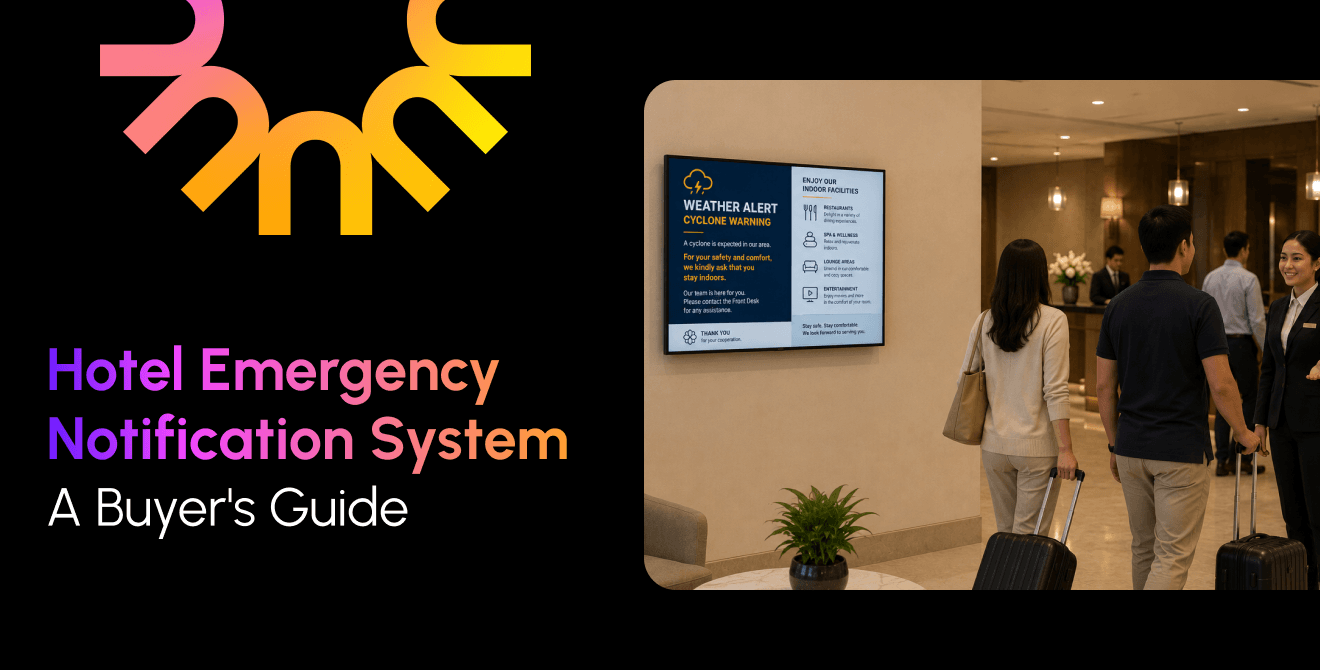
Digital signage adds a visual, location-specific layer to hotel emergency communication. When an authorized alert is triggered, lobby, corridor, elevator, meeting-room, and back-of-house screens can replace scheduled content with an approved emergency message. Mobile push can reach enrolled staff who are not near a screen.
A screen message should answer three questions in the order people need them: What is happening? What should I do? Where should I go or avoid? Use large type, strong contrast, and short sentences. Build multilingual templates for the languages identified in the property’s risk and guest profile, and use symbols only when their meaning has been validated.
Location changes the instruction. A lobby display may show the approved exit or shelter direction for that zone, while a meeting-room screen may direct attendees to a designated assembly point. The message should remain consistent with the alarm.
Treat content override as a controlled safety function. Test which playlists, applications, and screen states it supersedes, how quickly the alert appears, how it is acknowledged, and how normal content resumes. Do not assume that a powered screen is online or visible; monitoring and physical drills must validate the route from trigger to display.
Target Alerts by Property, Building, Floor, and Role
An effective system can send an alert across a portfolio or narrow it to one property, building, tower, floor, zone, or staff role. Precision reduces irrelevant messages, preventing important messages from being overlooked by affected visitors. Build and test target groups before an incident rather than drawing them under pressure.
For example, a weather warning affecting an outdoor pool area may require targeted guidance on pool screens and mobile alerts to recreation, security, and operations staff. A tower evacuation follows a different approved workflow and may require certified alarm and voice systems, screen groups for the affected tower and coordinated instructions at adjacent areas. The emergency plan, not the software interface, determines the scope.
Centralized control and governance across hotel groups
Emergency governance should make it fast for authorized people to send an approved alert and hard for anyone else to do so. A multi-property hotel group needs one administrative view, local permissions, preapproved templates, role-based access, and an audit record of who sent, changed, corrected or cleared each message.
Corporate security can own common alert language, testing standards, and escalation paths. Local leaders can retain the authority required by the property’s emergency plan. Break-glass access may be appropriate for narrowly defined situations, but it needs strong authentication, logging, review, and periodic testing. The process should also specify who can issue an all-clear and how a false or mistaken alert is corrected across every channel.
Poppulo helps organizations communicate quickly and consistently during emergencies by making it easy to manage and deliver alerts across their digital signage network from one central platform. Whether alerts are activated manually or through integrated technologies, Poppulo helps get critical information in front of the right people when it matters most. Integrations with fire alarms, weather feeds, or other automated triggers should be reviewed and approved to ensure they align with the property’s safety requirements and emergency response procedures.
How to Choose a Digital Signage Provider for Hotel Emergency Communications
When an emergency happens, getting clear, timely information in front of guests and staff is essential. While hotels often have dedicated emergency management systems (EMS) in place, digital signage can play a valuable supporting role by extending important messages to screens throughout the property.
The key is choosing a digital signage provider that can work with your existing technology, rather than adding another disconnected system to manage.
| Checklist area | What to verify |
|---|---|
| 1 Proven Integrations with EMS | Provider has experience integrating with a variety of EMS platforms. Platform has the ability to connect signage with existing systems to help hotels communicate efficiently without relying on manual updates. |
| 2 Centralized Management Across Property | Screens in lobbies, meeting spaces, restaurants, hallways, and other high-traffic areas can be centrally managed by chosen platform. |
| 3 Emergency Alert Takeover Capabilities | Important messages stand out during an emergency. Alert takeovers and urgent communications can temporarily replace scheduled content. |
| 4 Flexible Communication Across Locations | For groups with multiple properties, a solution that can support communications for single properties or a broader network is crucial. This ensures messaging is managed to each organizations needs. |
| 5 A Platform for Everyday Communications | Platform can support day-to-day guest communications, wayfinding, event information, and operational updates that make it a valuable investment outside of emergencies. |
How Poppulo Supports Hotel Emergency Communications
Poppulo makes digital signage a part of their broader communications strategy. With centralized content management, emergency alert takeover capabilities, and integration options for existing technologies, Poppulo enables hotels to extend important communications across their network.
Rather than replacing dedicated emergency management or life-safety systems, Poppulo helps bring critical messages to the screens guests and staff already see throughout the property.
Frequently Asked Questions
Which hotel emergency notification system is best?
The best system is the one that fits the hotel’s approved emergency plan, life-safety architecture, hazards, audiences and operating model. Compare channels, targeting, governance, integrations, offline behavior and measured delivery time. Involve security, facilities, IT, operations, qualified life-safety professionals and the authority having jurisdiction before making a selection.
What are the three types of emergency alerts?
There is no single universal three-type list for every hotel. A practical notification workflow often includes an initial warning, an action or update message, and an all-clear or correction. Hotels must plan for specific protective actions, such as evacuation, shelter in place or avoiding an area, based on the incident and approved procedures.
Is digital signage enough for hotel emergencies?
Digital signage plays a critical role in emergency communications. By delivering high-impact visuals, screens can capture attention effectively and relay important instructions that ensure the safety of all tenants. Strategically placed screens provide clear, location-specific guidance that make every second count. Digital signage works alongside other systems such as fire alarms, public-address systems, and other emergency notification channels to strengthen overall campus safety, making it an essential part of a well-rounded communication strategy.
Can a fire alarm or weather feed trigger digital signage alerts automatically?
Potentially, but only when the integration is supported, engineered and approved for the property. Teams must define message authority, mapping, priority, failure behavior and manual override, then test the full sequence. Fire alarm interfaces and automated protective-action messages require review by qualified professionals and the authority having jurisdiction.
Build a Layered Hotel Emergency Communication Plan
Alarms, public-address, and voice evacuation systems remain the foundation where required. Digital signage and mobile alerts add targeted, real-time guidance that can help people understand the approved action for their location. The value comes from the complete operating model: mapped zones, preapproved messages, trained senders, accessible content, tested integrations, clear fallbacks and an all-clear process.
Poppulo can help hotel groups add centrally managed digital signage alert takeovers and mobile communication to a broader emergency notification strategy. System design and use should remain aligned with each property’s life-safety systems, emergency plan and local authority requirements. If you’re ready to strengthen your hotel group’s emergency communication strategy, reach out today to begin scoping out your integration.